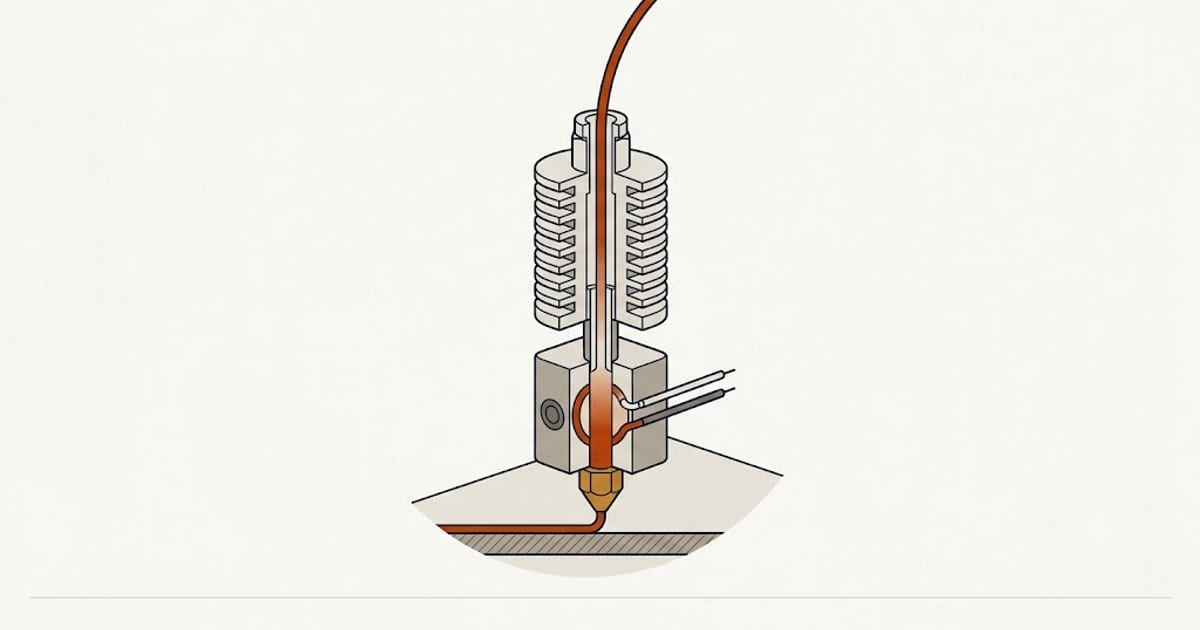
Search for a PLA temperature and you get a number: 200 °C, or 210, or "somewhere around 200–220." Every one of those answers is guessing on your behalf, because the number that matters is not a property of PLA. It is a property of your spool, and the manufacturer already published it.
Here is what the four most widely sold PLA brands actually print on their own data sheets.
What the manufacturers publish
| Filament | Nozzle | Bed | Fan | Speed | Drying |
|---|---|---|---|---|---|
| Prusament PLA | 210 ± 10 °C | 40–60 °C | 100 % | up to 200 mm/s | not specified |
| Polymaker PolyLite PLA | 190–230 °C | 25–60 °C | on | 50–200 mm/s | 55 °C / 6 h |
| Bambu PLA Basic | 190–230 °C | 35–45 °C | 100 % | < 300 mm/s | 55 °C / 8 h |
| eSUN PLA+ | 210–230 °C | 45–60 °C | 100 % | < 300 mm/s | 50 °C / 8–12 h |
Sources: Prusament PLA technical datasheet v1.1 (16 Feb 2022); Polymaker PolyLite PLA TDS; Bambu PLA Basic technical data sheet v2.0; eSUN PLA+ product specification. All figures are for 1.75 mm filament through a 0.4 mm nozzle.
Two things in that table are worth more than the headline numbers.
The bed temperatures disagree by 35 °C. Bambu says 35–45 °C. eSUN says 45–60 °C. Those ranges barely overlap, and both are correct — for their own material on their own assumed build surface. A single "PLA bed temperature" answer cannot be right for both.
Only two of the four publish a drying schedule. That is not because the other two are immune to moisture. It is because a data sheet lists what the manufacturer chose to test and commit to, not everything that affects your print.
Why identical-looking spools want different heat
PLA is not one polymer. It is a base polylactic acid resin plus whatever the manufacturer blended in — impact modifiers, pigment, nucleating agents, sometimes a second polymer entirely.
- Pigment shifts the number. Carbon black and titanium dioxide change how the melt flows and how fast the part sheds heat. Within a single brand, a black spool and a white spool can want a 5–10 °C difference. This is why manufacturers publish a range rather than a point.
- "PLA+" is a different material. Look at eSUN PLA+ in the table: its range starts at 210 °C, a full 20 °C above where PolyLite and Bambu Basic start. The toughening additives that make PLA+ less brittle also make it stiffer in the melt, so it needs more heat to flow properly. Treating a PLA+ spool like plain PLA is one of the most common causes of weak layer bonding.
- The published range assumes a speed. Prusament is rated to 200 mm/s, Bambu Basic to under 300 mm/s. Filament moving faster spends less time in the melt zone, so the same nozzle setting delivers less actual heat into the plastic.
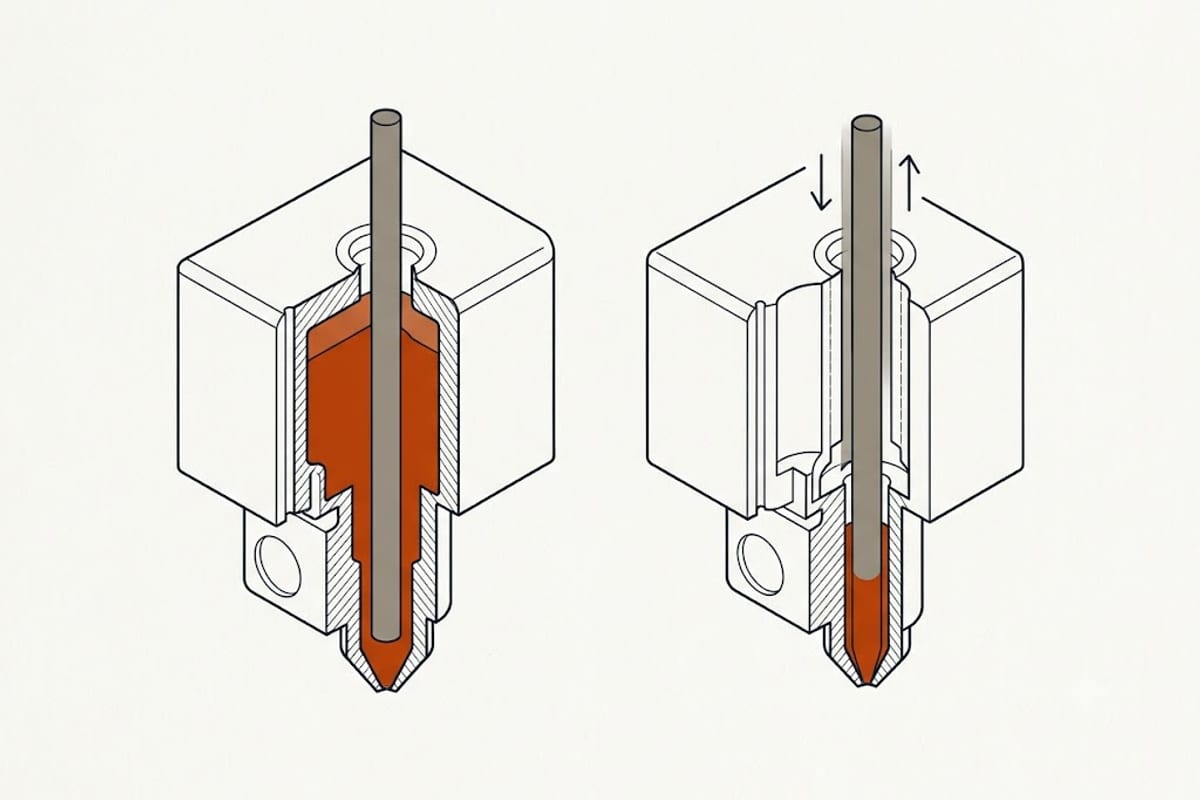
That last point is the one that catches people moving to a faster printer. Nothing about the filament changed and nothing about the setting changed, but the plastic leaving the nozzle is measurably cooler because it had less time to absorb heat. If you raised your speeds and your parts got weaker, you did not find a bad spool — you moved the same setting to a different operating point.
Reading the print instead of the spool
Your printer's thermistor reports the temperature of the heater block, not of the plastic. Two printers reporting 210 °C can be delivering meaningfully different heat, depending on the thermistor's position, the hot end design and the ambient temperature of the room. That is why the manufacturer's range is a starting point rather than an answer.
The print itself tells you where you are inside that range:
| What you see | What it means | Direction |
|---|---|---|
| Layers separate when flexed; matte, dry-looking surface | Not enough heat to fuse layers | Up 5 °C |
| Under-extrusion, clicking extruder, gaps in solid infill | Melt too viscous to push | Up 5–10 °C |
| Fine strands between separate parts of the model | Too fluid; oozes during travel | Down 5 °C |
| Glossy surface, sagging overhangs, drooping bridges | Cooling too slowly to hold shape | Down 5 °C, check fan |
| Corners lifting off the bed | Bed and first layer, not nozzle | See below |
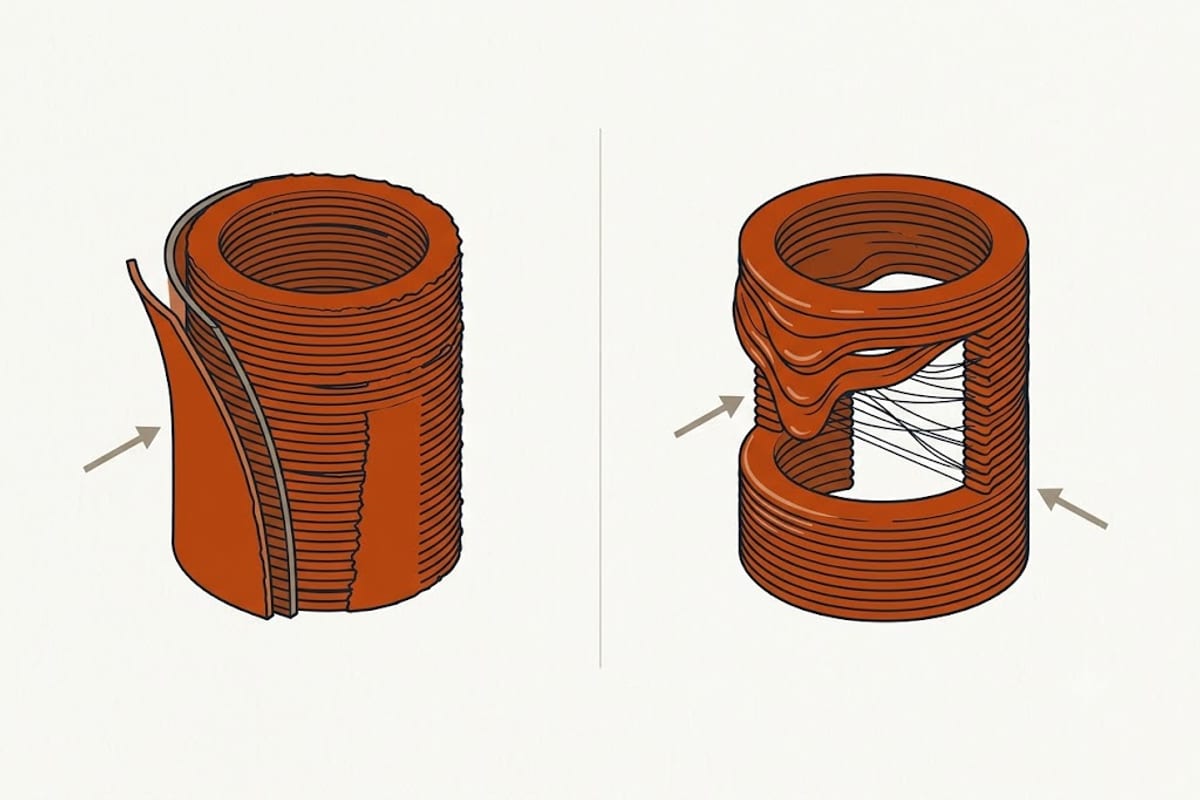
Both failures in that image came from the same printer, the same spool, and the same file. Only the nozzle setting changed.
The single most useful correction: weak layer bonding is almost always too cold, and stringing is almost always too hot. If you have both at once you do not have a temperature problem — you have a wet spool, and no temperature will fix it.
Finding your own number
Do not accept a number from the internet, including this page. Print a temperature tower: one model, one print, with the nozzle stepped down 5 °C every few millimetres of height. In about 45 minutes you get a physical sample of your filament at every temperature in its published range, printed on your machine, in your room.
That is the only measurement that accounts for your thermistor, your hot end and your ambient conditions at the same time. We walk through the setup, including the two settings people usually get wrong, in how to print a PLA temperature tower.
Once you have the nozzle settled, two other numbers do most of the remaining work:
- PLA bed temperature — the figure that varies most between brands, and the one most dependent on your build surface rather than your filament.
- PLA first layer settings — where nozzle, bed and speed interact, and where most failed prints are actually decided.
And if you are chasing strands rather than temperature, start at fixing PLA stringing — retraction and moisture explain more of it than heat does.
FAQ
What is the best temperature for PLA?
There is no single best temperature. The published ranges from major brands span 190–230 °C, and the correct value for your spool is somewhere inside the range printed on its own data sheet. Start at the middle of that range and adjust based on layer adhesion and stringing.
Why does my PLA need a higher temperature than the label says?
Most often because your printer reports the heater block temperature rather than the plastic temperature, and thermistor placement varies between machines. Printing faster has the same effect: the filament spends less time in the melt zone, so it leaves the nozzle cooler than the setting suggests.
Does PLA+ print at the same temperature as PLA?
No. eSUN publishes 210–230 °C for PLA+, against 190–230 °C for standard PLA from Polymaker and Bambu. The additives that make PLA+ tougher also make it flow less easily, so it generally needs more heat than plain PLA from the same brand.
Can I print PLA without a heated bed?
Polymaker publishes a bed range starting at 25 °C, which is room temperature — so for that material, yes, on a suitable surface. Prusa and eSUN both start their ranges at 40 °C and above. Check your own spool's data sheet rather than assuming.
Does temperature cause warping?
Rarely the nozzle temperature. Warping is caused by uneven cooling as the part contracts, so it is governed by bed temperature, first layer adhesion and draughts around the printer far more than by how hot the nozzle runs.